• Choose the truck that suits your needs.
• Invoice will be mailed to you on completion of the trip
Skype a famous VoIP calling and chat service, is now offering you FREE Unlimited Calling for an entire month. That means, in addition to making free Skype to Skype calls, you can also call offline contacts on their mobiles and land lines for free.
BEFORE YOU LEAVE….
Please Sign-up for our free newsletter to get all new UPDATES directly in your Inbox.
We need your Support & Like for our Facebook Page - Visit here official facebook page for more posts and click LIKE button.
You may also interested in
HOW TO FIND THE MOBILE NUMBER OF ANY SIM CARD
How To Remove Shortcut Virus From Pendrives And Memory Cards
Easily Remove Your Pendrive Virus Without Using Any Antivirus
How To Get Your Forgotten Nokia Phone's Security Master Code Easily?
Flipkart BIG BILLION DAY....Grab Nokia LUMIA 520 for only Rs.4999/- only…Offer valid only today 6th Oct 2014. Nokia 520 is an Windows Phone 8.1 Smartphone with 4 inch display. It is powered by 1 GHz Snapdeagon processor and 512 MB RAM.
CLICK HERE FOR MORE WINDOWS MOBILE OR LUMIA TIPS AND TRICKS.
CLICK HERE FOR MORE ANDROID TIPS AND TRICKS.
CLICK HERE FOR MORE COMPUTER TRICKS.
BEFORE YOU LEAVE….
Please Sign-up for our free newsletter to get all new UPDATES directly in your Inbox.
We need your Support & Like for our Facebook Page - Visit here official facebook page for more posts and click LIKE button.
You may also interested in
HOW TO FIND THE MOBILE NUMBER OF ANY SIM CARD
How To Remove Shortcut Virus From Pendrives And Memory Cards
Easily Remove Your Pendrive Virus Without Using Any Antivirus
How To Get Your Forgotten Nokia Phone's Security Master Code Easily?
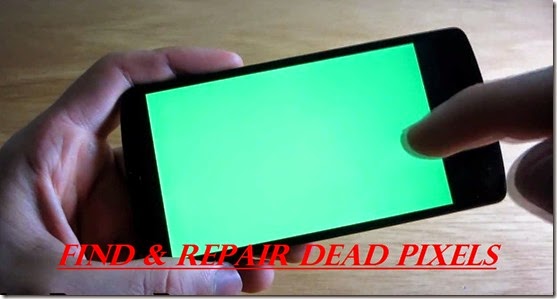
Here is an app called Dead Pixel Detect and Fix, which can detect dead pixels and helps in even repair them.
Features of Dead Pixel Detect and Fix:
Detect any stuck or dead pixel on your LCD screen.
Provide EASY way to fix the stuck pixel.
Also works for screen burn-in.
No more defective pixels on your precious device.
Custom Color and 6 predefined colors to choose from for manual inspection: red, green, blue, white, black, grey.
Recommend to run 6-12 hours "Fix it!!" for reviving stuck pixel.
If you try the FIX function for several times and the issue still exist, please consider exchange your device for new one or contact your mobile service provider.
You can use the "COLOR" to prove there IS or ARE dead pixels on your LCD screen.
Note: We do not take any responsibility and we are not liable for any damage which may rise on using the "FixIt" function. We do not endorse or guarantee any result of the "FixIt" function.
CLICK HERE FOR MORE WINDOWS MOBILE OR LUMIA TIPS AND TRICKS.
CLICK HERE FOR MORE ANDROID TIPS AND TRICKS.
CLICK HERE FOR MORE COMPUTER TRICKS.
Screen Shots:
BEFORE YOU ARE LEAVING….
Be updated by following us on Google+ and liking our Facebook Page. Or subscribe to our Free News Letter.
You may also interested in
HOW TO FIND THE MOBILE NUMBER OF ANY SIM CARD
How To Remove Shortcut Virus From Pendrives And Memory Cards
Easily Remove Your Pendrive Virus Without Using Any Antivirus
How To Get Your Forgotten Nokia Phone's Security Master Code Easily?
If you are using your android mobile for playing games or using it for extended periods, you may end up with over heating of your mobile. You may noticed that mobile will get little hot. Today in this post I will tell you how to over come this problem. Here is an app called Coolify, which test your device temperature and helps to reduce the temperature of your mobile.
Coolify is an app that can be used to help prevent overheating on your Android devices. By constantly measuring the temperature values of the device, it provides useful information that helps you maintain an optimal internal temperature and also extend the life of your battery.
Coolify help you to cool your rooted devices down when you are not using them or your devices are charging in an original and unique way!
CLICK HERE FOR MORE WINDOWS MOBILE OR LUMIA TIPS AND TRICKS.
CLICK HERE FOR MORE ANDROID TIPS AND TRICKS.
CLICK HERE FOR MORE COMPUTER TRICKS.
Coolify will give you the unique experience:
1. Keep your device Normal temperature
2. One-Click Optimization;
3. Coolify is nearly transparent! Set and forget!
4. The simple user interface and without major uncomfortable impact on user experience;
5. Never need to deal with the complexity and risk;
6. Support Immersive mode
At last, Coolify do need a background persistent cooling service to cool down when you are not actively using them. It is designed and implemented in extremely light-weight. and nearly zero CPU and battery consumption when this service in Background.
DOWNLOAD COOLIFY ON YOUR ANDROID (click here)
Note: To use Coolify on your Android Mobile, Your mobile must be Rooted.
Screen Shots:
Be updated by following us on Google+ and liking our Facebook Page. Or subscribe to our Free News Letter.
You may also interested in
HOW TO FIND THE MOBILE NUMBER OF ANY SIM CARD
How To Remove Shortcut Virus From Pendrives And Memory Cards
Easily Remove Your Pendrive Virus Without Using Any Antivirus
How To Get Your Forgotten Nokia Phone's Security Master Code Easily?
Regarding the Lumia Cyan update Microsoft is now "targeting a whole lot more (devices) starting today" with the updates. However, this means not all phones are yet eligible for Cyan, so we will have to wait and find out which are the lucky phones.Microsoft to begin pushing out an OS update for preview for developers of Windows Phone 8.1.1 users on 24th Sept 2014. Preview for Developers - a new update is now live. Version 14176 of Windows Phone 8.1.1 is the new update.
CLICK HERE FOR MORE WINDOWS MOBILE OR LUMIA TIPS AND TRICKS.
CLICK HERE FOR MORE ANDROID TIPS AND TRICKS.
CLICK HERE FOR MORE COMPUTER TRICKS.
Confirmed that HTC devices are now eligible for the Preview updates, including the HTC 8X and HTC 8XT.
The Windows Blog has posted details about the update:
"Build 8.10.14176 starts rolling today to developer preview participants, and provides a bunch of performance improvements and general fixes. One of the important fixes addresses an issue some folks were seeing during the update process – the 80188308 error – which resulted from running out of storage space in the system partition during update. We expect this fix to solve the update issue for most users."
Regarding the Lumia Cyan update Microsoft is now "targeting a whole lot more (devices) starting today" with the updates. However, this means not all phones are yet eligible for Cyan, so we will have to wait and find out which are the lucky phones.
We can confirm that the HTC One for Windows is also getting the Preview update
The AT&T Lumia 920 and Lumia 925 are two of the phones that can now receive Lumia Cyan if already on 8.1.1
Users in India with Lumia 720 and Lumia 920s are reporting Cyan updates are unblocked. Some other Lumia 920 and 1520 users are also saying the same, though region and carrier details vary.
Source: wpcentral
Be updated by following us on Google+ and liking our Facebook Page. Or subscribe to our Free News Letter.
You may also interested in
HOW TO FIND THE MOBILE NUMBER OF ANY SIM CARD
How To Remove Shortcut Virus From Pendrives And Memory Cards
Easily Remove Your Pendrive Virus Without Using Any Antivirus
How To Get Your Forgotten Nokia Phone's Security Master Code Easily?
Our smart phones battery dies too fast and that causes problem for us most of the times. To solve this, we generally carry a backup battery. We have to turn off our phone before replacing the discharged battery. We all know the uneasiness that we face while our phone is OFF.
Samsung is coming up with a smart phone that doesn’t get shut down when its battery is removed and thus you can use smart phone without battery.
The smart phone will consist of two batteries; the main battery and the supplementary battery. The main battery recharges the supplementary battery, thus you don’t have to recharge it separately. The supplementary battery will be present inside the smart phone itself and you won’t be able to remove it.
CLICK HERE FOR MORE WINDOWS MOBILE OR LUMIA TIPS AND TRICKS.
CLICK HERE FOR MORE ANDROID TIPS AND TRICKS.
CLICK HERE FOR MORE COMPUTER TRICKS.
HOW IT WORKS?
Samsung is going to place a sensor under the battery cover. Whenever you will remove the battery the cover sensors will get activated and will switch the power supply of your smart phone from main battery to the supplementary battery. Thus your smart phone will keep on working even after removing its battery.
The objective of supplementary battery is not to run the phone same as the main battery. It is supposed to only act as a backup and supply power to only selected parts of the smart phone. After switching the power supply to supplementary battery, the CPU sends phone to sleep mode so that it can retain it state rather than loosing all the data due to abrupt shutdown.
Be updated by following us on Google+ and liking our Facebook Page. Or subscribe to our Free News Letter.
You may also interested in
HOW TO FIND THE MOBILE NUMBER OF ANY SIM CARD
How To Remove Shortcut Virus From Pendrives And Memory Cards
Easily Remove Your Pendrive Virus Without Using Any Antivirus
How To Get Your Forgotten Nokia Phone's Security Master Code Easily?
1. Giving Chrome Access to more memory:
This one is crucial and easy to do. By typing in the following URL in your browser, Chrome will get access to more RAM, make sure to select 512MB. Here is the url: chrome://flags/#max-tiles-for-interest-area
2. Enabling offline mode:
This will force Chrome to store more information of a particular website in the Cache, allowing you to browse websites you visit frequently with more speed. This can be accomplished by typing the following URL: chrome://flags/#enable-offline-mode
CLICK HERE FOR MORE WINDOWS MOBILE OR LUMIA TIPS AND TRICKS.
CLICK HERE FOR MORE ANDROID TIPS AND TRICKS.
CLICK HERE FOR MORE COMPUTER TRICKS.
3. Make new tabs load faster:
By entering the following URL you can change the new tab window and improve its overall performance by enabling and disabling several features. Here is the URL: chrome://flags/#enable-new-ntp
4. Entering the Advanced Setting mode:
Many small tweaks can be made from the advanced setting mode, we highly suggest you take a look around and disable anything that could be slowing your browser down. Here is the URL: chrome://flags
5. Using the Chrome Beta:
Usually Chrome Beta’s come with huge performance issues and stability improvement, we highly recommend you download a new Chrome Beta whenever it is available. You can download the latest one here
SOURCE: http://www.amongtech.com/
BEFORE YOU LEAVE….
Please Sign-up for our free newsletter to get all new UPDATES directly in your Inbox.
We need your Support & Like for our Facebook Page - Visit here official facebook page for more posts and click LIKE button.
You may also interested in
HOW TO FIND THE MOBILE NUMBER OF ANY SIM CARD
How To Remove Shortcut Virus From Pendrives And Memory Cards
Easily Remove Your Pendrive Virus Without Using Any Antivirus
How To Get Your Forgotten Nokia Phone's Security Master Code Easily?
Smart Selfie is a voice guided photography app that use facial recognition to guide you in how to move or rotate your phone to take the perfect selfie with the back camera. It is one of the best android selfie taking apps in the PlayStore.
Why to use the back camera for selfie?
* You should always treasure your memories, remember to use your best camera for taking photos. With smart selfie you can take perfect selfie every time without any guesswork on where your face is in the photo.
* If your phone lacks front camera then Smart Selfie is perfect for you.
* Why to use a low 0.3 - 1.3mp front camera camera, when you can use 3.2mp+ camera available at back on nearly all phones.
Once you have taken the photo you can share the photo online through popular social networking apps or send the photo to other apps for further enhancements.
FEATURES OF SMART SELFIE:-
1.The best thing with this app is no need of front camera, you can use your high end back camera for taking selfie.
2.Once your camera is in position Smart Selfie takes the photo automatically. There is no need to press any buttons, touch the screen, whistle, set timers, or give voice commands to take a photo.
3.With Smart Selfie you can take selfies of a single person or take selfies with multiple people at once in the same photo.
DOWNLOAD SMART SELFIE ON YOUR ANDROID (click here)
How to use (see user guide in app for more detail)
1) Take note if photo is set to Portrait or landscape. Rotate Camera or adjust settings
2) Point back camera at your face, hold the phone about 30cms from your face
3) Follow the voice prompt, Move or angle your phone.
4) Hold the camera still when advised. The photo will be taken automatically.
5) Use the inbuilt gallery to view your photos. Or access them with other apps they are located in your Pictures/Smart Selfie/ folder (optional step)
CLICK HERE FOR MORE WINDOWS MOBILE OR LUMIA TIPS AND TRICKS.
CLICK HERE FOR MORE ANDROID TIPS AND TRICKS.
CLICK HERE FOR MORE COMPUTER TRICKS.
Current detection/useability features:
* Zoom Factor
*Face Balance
* Selfie stick Supported/Camera stand support
* Smart Flash
* Measure
* Eyeliner
* Quick Presets
Note: Please exit Smart Selfie when not in use. It might drain battery when minimized.
Note:- Smart Selfie is still under development if Smart Seflie stops running try restarting your android device. You can also turn on SAFE MODE in smart selfie's camera settings. This may stop your crashes.
SCREEN SHOTS:-
BEFORE YOU LEAVE….
Please Sign-up for our free newsletter to get all new UPDATES directly in your Inbox.
We need your Support & Like for our Facebook Page - Visit here official facebook page for more posts and click LIKE button.
You may also interested in
HOW TO FIND THE MOBILE NUMBER OF ANY SIM CARD
How To Remove Shortcut Virus From Pendrives And Memory Cards
Easily Remove Your Pendrive Virus Without Using Any Antivirus
How To Get Your Forgotten Nokia Phone's Security Master Code Easily?
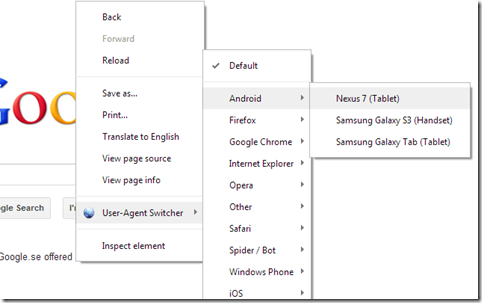
You may come with problem like browse mobile sites with your PC browsers like Mozilla Firefox, Google chrome,Internet Explorer etc. Mobile sites are not open and they may shows an empty page instead of content. Mobile site designers develop sites based on the mobile web browser interface.
But there is a way to browse mobile sites and download mobile content on PC. That's an add-on called
User agent switcher. You can add this to your browser to browse mobile sites. User agent switcher is an add-on available on Firefox and chrome.
DOWNLOAD USER AGENT SWITCHER
Go to the above link & click on Add to Firefox .
Now a confirmation dialogue box will be displayed,click on install now button.
Add on will be installed.
Now restart Firefox for taking this effect to the browser.
Now go to Tools menu in menu bar and select default user agent,it shows available agents.
Select iPhone 3.0 by clicking on it.Type the url of the mobile sites like Teluguwap.net ,mobile9.com .
CLICK HERE FOR MORE WINDOWS MOBILE OR LUMIA TIPS AND TRICKS.
CLICK HERE FOR MORE ANDROID TIPS AND TRICKS.
CLICK HERE FOR MORE COMPUTER TRICKS.
FOR CHROME BROWSER:-
You can access all WebPages that includes in the mobile site and also download content from it.
You can also access railway reservation site faster than desktop site .
BEFORE YOU LEAVE….
Please Sign-up for our free newsletter to get all new UPDATES directly in your Inbox.
We need your Support & Like for our Facebook Page - Visit here official facebook page for more posts and click LIKE button.
You may also interested in
HOW TO FIND THE MOBILE NUMBER OF ANY SIM CARD
How To Remove Shortcut Virus From Pendrives And Memory Cards
Easily Remove Your Pendrive Virus Without Using Any Antivirus
How To Get Your Forgotten Nokia Phone's Security Master Code Easily?