Wednesday, October 1, 2014

Hurry!! Download Your Windows 10 Technical Preview For Free

According to the Indian Standard Time(IST) Windows 10 Technical Preview downloading links are available from 9.30PM 1st Oct 2014.
Windows_10[4]
So here is the procedure how to download the links
1. Go to https://insider.windows.com this link
mm
2. Sign up for new account, if you don't have windows account earlier
3. Click Join Now and then Click Accept Terms
11
4. You will get a message like Congrats, you are an insider and there is a link Install Technical Preview – click on that
2
5. That's it !!!
3
Your links for Windows 10 Technical Preview will go live at 9.30PM

UPDATED:


Be updated about windows 10 by following us on Google+ and liking our Facebook Page. Or subscribe to our Free News Letter.
You may also interested in

New Windows 10 Features – You Must Know

Today On September 30 2014 10 PM (+5:30 IST) Microsoft Launched Preview Of Its New Operating System WINDOWS 10, Which was Previously Rumored as WINDOWS 9.
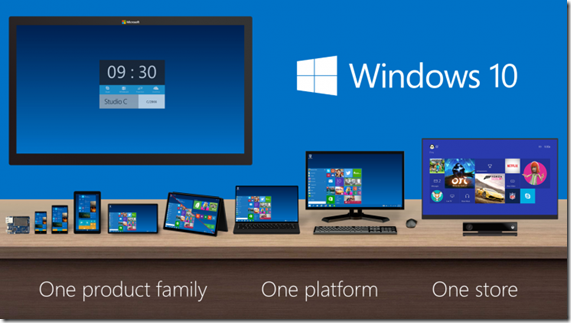
Windows_10_Product_Family
FEATURES OF WINDOWS 10
  • The Windows Charm bar is still here.
  • One store, one way for applications to be discovered, purchased, and updated across all of these devices.
    For Enterprises :
    • Windows 10 will be compatible with all the traditional management systems used today.
    • With Windows 10 Enterprise customers will be able to customize the store.
    Start Menu:
    • You can resize the tiles on the Start Menu, change its size.
    • Universal search from the Start Menu, and web results.
    New feature CONTINUMM
    • Windows 10 will have this new Feature "Continuum".
    • which is designed to make it easy for users to switch between touch interfaces and non-touch environments.
    • This interface was built specifically for devices such as the Surface Pro 3 and Lenovo Yoga, which have users switching between touch and non-touch interfaces often.
    Multi-Tasking
    • You can now paste the directories into command prompt with Ctrl+V.
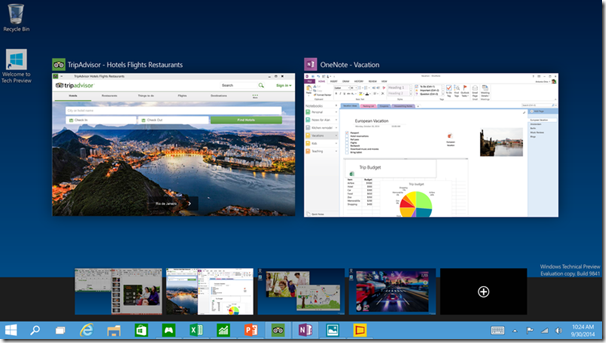
    • There's a new "Snap Assist" UI at the side where you can grab apps from multiple desktops
Everything runs in a window:
  • Apps from the Windows Store now open in the same format that desktop apps do and can be resized and moved around, and have title bars at the top allowing for maximize, minimize, and close with a click.
Multiple desktops:
  • Create desktops for different purposes and projects and switch between these desktops easily and pick up where you left off on each desktop.
Find files faster:
  • File Explorer now displays your recent files and frequently visited folders making for finding files you've worked on is easier.
New task view button:
  • There's a new task-view button on the taskbar for quick switching between open files and quick access to any desktops you create.
Snap enhancements:
  • You can now have four apps snapped on the same screen with a new quadrant layout. Windows will also show other apps and programs running for additional snapping and even make smart suggestions on filling available screen space with other open apps
Availability 
  • Starting tomorrow Microsoft is going to launch our Windows Insider Program.
  • Technical Preview build for laptops, Desktops and Servers.
  • Windows 10 shipping starts  in 2015, and it will be available as a Update for majority devices.
  • Windows 10 Is The New Operating System For Devices Screens ranging from 4 inches to 80 inches, Well That means Windows 10 Will also be Next Version Of Phone OS Too.
  • Windows 10 will support the apps that are in Windows Store Already.
  • Windows will be supporting  Windows 10 For Enterprises for about 10 years.

    Get Windows 10 Developers Preview : HERE

    SCREEN SHOTS:
    5845574_orig
    3967152_orig
    Tech-Preview_Virtual-desktop 
Be updated about WINDOWS 10 by following us on Google+ and liking our Facebook Page. Or subscribe to our Free News Letter.
You may also interested in

Microsoft Announces Windows 10, The Next Version Of Windows

Microsoft has just announced the next version of Windows, early this morning 1st Oct 2014. They're not calling it Windows One, or Windows 9, instead decided to call it Windows 10.

Windows_10

Microsoft isn't live streaming the event, but invitees are live tweeting the announcement. Microsoft's Terry Myserson is quoted as saying the new Windows has been built from the ground up for a mobile first, cloud first world. The new platform will come with one store for developers to reach consumers across phone, tablet and PC.

CLICK HERE FOR MORE WINDOWS MOBILE OR LUMIA TIPS AND TRICKS.

CLICK HERE FOR MORE ANDROID TIPS AND TRICKS.

CLICK HERE FOR MORE COMPUTER TRICKS.

Sign ups will be taken at the preview.windows.com website. Technical previews for Windows 10 server users will be released later. A consumer preview version will be release early in 2015. Microsoft has also announced a new Build developer conference in April and that Windows 10 will be available in mid-2015.

Be updated about WINDOWS 10 by following us on Google+ and liking our Facebook Page. Or subscribe to our Free News Letter.

You may also interested in

HOW TO FIND THE MOBILE NUMBER OF ANY SIM CARD

How To Remove Shortcut Virus From Pendrives And Memory Cards

Easily Remove Your Pendrive Virus Without Using Any Antivirus

How To Get Your Forgotten Nokia Phone's Security Master Code Easily?

Thursday, September 25, 2014

Microsoft Releases An Update For Windows Phone 8.1.1

lumia920_2330131b

Regarding the Lumia Cyan update Microsoft is now "targeting a whole lot more (devices) starting today" with the updates. However, this means not all phones are yet eligible for Cyan, so we will have to wait and find out which are the lucky phones.Microsoft to begin pushing out an OS update for preview for developers of Windows Phone 8.1.1 users on 24th Sept 2014. Preview for Developers - a new update is now live. Version 14176 of Windows Phone 8.1.1 is the new update.

14176

CLICK HERE FOR MORE WINDOWS MOBILE OR LUMIA TIPS AND TRICKS.

CLICK HERE FOR MORE ANDROID TIPS AND TRICKS.

CLICK HERE FOR MORE COMPUTER TRICKS.

Confirmed that HTC devices are now eligible for the Preview updates, including the HTC 8X and HTC 8XT.

The Windows Blog has posted details about the update:

"Build 8.10.14176 starts rolling today to developer preview participants, and provides a bunch of performance improvements and general fixes. One of the important fixes addresses an issue some folks were seeing during the update process – the 80188308 error – which resulted from running out of storage space in the system partition during update. We expect this fix to solve the update issue for most users."

Regarding the Lumia Cyan update Microsoft is now "targeting a whole lot more (devices) starting today" with the updates. However, this means not all phones are yet eligible for Cyan, so we will have to wait and find out which are the lucky phones.

We can confirm that the HTC One for Windows is also getting the Preview update

The AT&T Lumia 920 and Lumia 925 are two of the phones that can now receive Lumia Cyan if already on 8.1.1

Users in India with Lumia 720 and Lumia 920s are reporting Cyan updates are unblocked. Some other Lumia 920 and 1520 users are also saying the same, though region and carrier details vary.

Source: wpcentral

Be updated by following us on Google+ and liking our Facebook Page. Or subscribe to our Free News Letter.

You may also interested in

HOW TO FIND THE MOBILE NUMBER OF ANY SIM CARD

How To Remove Shortcut Virus From Pendrives And Memory Cards

Easily Remove Your Pendrive Virus Without Using Any Antivirus

How To Get Your Forgotten Nokia Phone's Security Master Code Easily?

Thursday, September 18, 2014

Get Android Kitkat Experience On Your Windows Phone With KitKat Launcher

If you want the Android Kitkat home screen into  your Windows Smartphone then now it is possible with the help of a app which us available in the Windows Phone Store. The KitKat Launcher is one of the best windows phone app to help you experience the Android User Interface on your windows phone device.

DOWNLOAD KITKAT LAUNCHER FOR WINDOWS PHONE – CLCICK HERE

CLICK HERE FOR MORE WINDOWS MOBILE OR LUMIA TIPS AND TRICKS.

CLICK HERE FOR MORE ANDROID TIPS AND TRICKS.

CLICK HERE FOR MORE COMPUTER TRICKS.

You can get same homescreens experience, place icons anywhere you want, place widgets, set your wallpaper. Personalize this app the way you like. You get the same Dialer, unique gallery.

Try any feel it yourself.

SCREEN SHOTS:

11

2

3

BEFORE YOU LEAVE….

If you think this is useful, help us to share this information to your buddy.

Please Sign-up for our free newsletter to get all new UPDATES directly in your Inbox.

We need your Support – Like & Share our Facebook Page - Visit here official facebookpage for more posts and click LIKE button.

You may also interested in

HOW TO FIND THE MOBILE NUMBER OF ANY SIM CARD

How To Remove Shortcut Virus From Pendrives And Memory Cards

Easily Remove Your Pendrive Virus Without Using Any Antivirus

How To Get Your Forgotten Nokia Phone's Security Master Code Easily?

Tuesday, September 2, 2014

4 Apps That You Should Download Rightnow On Your Mobile

A browser that accelerates browsing speed and a cool lock screen application: four apps that you should download right now. All the below four apps are Free Apps.
apps-480
1.Haptik
Customer Care
Hate calling customer support and talking to automated responders? Haptik app for iOS and Android lets you chat with in-house experts of popular brands across all industry segments. After you install this app, you can save a list of brands whose products you use. Haptik experts are people who have worked with the companies before or have used their products extensively. The list covers almost all brands. The response time is less than five minutes, and once you start chatting, the process continues until your query is solved.
CLICK HERE TO DOWNLOAD HAPTIK – ANDROID, iOS
44
2.Pinterest messaging
Message your pins
Until now, we could send a “pin” to another user who shares a common interest, and then respond to email notifications. Pinterest messaging helps you share pins and start conversations with people directly. The key difference is that there is no static contact list for chats. After a pin is sent, the user is given a list of contacts to choose from and is directed to a separate screen for messages in smartphones. Group messaging is also available with up to 10 members.
CLICK HERE TO DOWNLOAD PINTEREST – ANDROID
33
3.UC Browser
It’s Different
Every smartphone operating system comes with a web browser, but download UC Browser anyway. It accelerates browsing speed. The app includes a range of add-ons on its home page, including online shopping, PNR status check, videos, social media and other content from popular websites. Other features include QR Scanner, Clipboard, FB Faster and Ad Block.
CLICK HERE TO DOWNLOAD UC BROWSER – ANDROID, WINDOWS PHONE
22 
4.Locket
Lock Screen Stories
Locket is a lock screen application which brings to you five top trending online stories every time you wake up your phone. The content is delivered by Bloomberg, TechCrunch, VentureBeat and Engadget, but is mostly related to science and technology. There is global news and US-centric content, too. Users can also save stories to read in the future. The app doesn’t disturb the regular lock screen.
CLICK HERE TO DOWNLOAD LOCKET – ANDROID
qq
BEFORE YOU LEAVE….
Please Sign-up for our free newsletter to get all new UPDATES directly in your Inbox.
We need your Support & Like for our Facebook Page - Visit here official facebook page for more posts and click LIKE button.
You may also interested in
Source: indianexpress.com

Windows 9 Likely To Be Announced On September 30

Windows is all set to launch its next version Windows and if the experts are to be believed, it might end up rolling back a lot of the changes that it announced with Windows 8. The official unveiling could be as early as September 30 this year. The Windows might not have a lot of Windows 8 features.

windows_9_wallpaper_by_jameshd2k-d5y2s6o

Reports of a special Microsoft event first appeared on The Verge. There have already been reports that build, now called Threshold, will bring back the Start Menu in a way that is more familiar to Windows users and kill the Charms bar feature. In all probability, Cortana will also be an integral part of the next Windows.

BEFORE YOU LEAVE….

Please Sign-up for our free newsletter to get all new UPDATES directly in your Inbox.

We need your Support & Like for our Facebook Page - Visit here official facebook page for more posts and click LIKE button.

You may also interested in

HOW TO FIND THE MOBILE NUMBER OF ANY SIM CARD

How To Remove Shortcut Virus From Pendrives And Memory Cards

Easily Remove Your Pendrive Virus Without Using Any Antivirus

How To Get Your Forgotten Nokia Phone's Security Master Code Easily?

Thursday, August 28, 2014

How To Use Private Browsing On Windows/Lumia Mobile?

Windows is the third most popular mobile Operating System only after Android and iOS. The latest Windows Phone 8.1 update has introduced the private browsing option in Internet Explorer and

What Is Private Browsing?

Private Browsing prevents the Internet Explorer to store the data of your browsing session. It is called as InPrivate browsing and it includes temporary Internet files, Cookies, history and other data. This is an amazing feature and very glad to see it on Internet Explorer. Previously, if you want to browse privately you need to manually delete the history in the settings and now no need to do so. Some other third party browsers like UC Browser also supports the private browsing feature.

When the InPrivate browsing is turned on, you will then see the indicator. In this postwe will see how to browse privately on Windows Phone.

CLICK HERE FOR MORE WINDOWS MOBILE OR LUMIA TIPS AND TRICKS.

CLICK HERE FOR MORE ANDROID TIPS AND TRICKS.

CLICK HERE FOR MORE COMPUTER TRICKS.

Private_browsing


How to do private browsing on Windows Phone

  • Step 1 : Go to the Internet Explorer browser on your Windows Phone and click on the tab button which is left to the address bar and it then shows the tabs which are currently open.
  • Step 2 : Now click on the three dots present at the lower right corner to get more options.
  • Step 3 : Now click on ‘new inprivate tab’.
  • Step 4 : That’s it now you will be allowed to browse in the inprivate tab and it explains briefly what is all about and an indicator also appears in the address bar.

Done!!!!

Before You Go...

Please Sign-up for our free newsletter to get all new UPDATES directly in your Inbox.

We need your Support & Like for our Facebook Page - Visit here official facebook page for more posts and click LIKE button.


Tuesday, August 26, 2014

How To Block Ads In IE 11 for Windows 8.1?

Disable ads in Internet Explorer 11 for Windows 8.1

  • Open IE11 in Modern or Desktop mode
  • Bring up the Charms bar (swipe from the right)
  • Tap 'Settings'
  • Select 'Privacy'
  • Tap 'Add Tracking Protection Lists'

metro_ie_tile (1)

Following the above steps launches Microsoft's IE gallery, an online repository for their browser add-ons. Tracking Protection Lists’ is their fun euphemism for ad blocking. EasyList Standard is the same list that powers the familiar Adblock Plus plugin, giving the same ability to IE11 users as Chrome and Firefox.

CLICK HERE FOR MORE WINDOWS MOBILE OR LUMIA TIPS AND TRICKS.

CLICK HERE FOR MORE ANDROID TIPS AND TRICKS.

CLICK HERE FOR MORE COMPUTER TRICKS.

Ad_lists_IE11_block


You can also try  Adblock Plus - For an internet without annoying advertisements!

Click here to download Adblock Plus on your computer.

Before You Go...

Please Sign-up for our free newsletter to get all new UPDATES directly in your Inbox.

We need your Support & Like for our Facebook Page - Visit here official facebook page for more posts and click LIKE button.

You may also interested in

HOW TO FIND THE MOBILE NUMBER OF ANY SIM CARD
How To Remove Shortcut Virus From Pendrives And Memory Cards
Easily Remove Your Pendrive Virus Without Using Any Antivirus
How To Get Your Forgotten Nokia Phone's Security Master Code Easily?