Wednesday, September 24, 2014

How To Increase Speed Of Chrome For Android?

google_Chrome_android

5 EASY STEPS TO INCREASE SPEED OF CHROME FOR ANDROID

1. Giving Chrome Access to more memory:

This one is crucial and easy to do. By typing in the following URL in your browser, Chrome will get access to more RAM, make sure to select 512MB. Here is the url: chrome://flags/#max-tiles-for-interest-area

2. Enabling offline mode:

This will force Chrome to store more information of a particular website in the Cache, allowing you to browse websites you visit frequently with more speed. This can be accomplished by typing the following URL: chrome://flags/#enable-offline-mode

CLICK HERE FOR MORE WINDOWS MOBILE OR LUMIA TIPS AND TRICKS.

CLICK HERE FOR MORE ANDROID TIPS AND TRICKS.

CLICK HERE FOR MORE COMPUTER TRICKS.

3. Make new tabs load faster:

By entering the following URL you can change the new tab window and improve its overall performance by enabling and disabling several features. Here is the URL: chrome://flags/#enable-new-ntp

4. Entering the Advanced Setting mode:

Many small tweaks can be made from the advanced setting mode, we highly suggest you take a look around and disable anything that could be slowing your browser down. Here is the URL: chrome://flags

5. Using the Chrome Beta:

Usually Chrome Beta’s come with huge performance issues and stability improvement, we highly recommend you download a new Chrome Beta whenever it is available. You can download the latest one here

SOURCE: http://www.amongtech.com/

BEFORE YOU LEAVE….

Please Sign-up for our free newsletter to get all new UPDATES directly in your Inbox.

We need your Support & Like for our Facebook Page - Visit here official facebook page for more posts and click LIKE button.

You may also interested in

HOW TO FIND THE MOBILE NUMBER OF ANY SIM CARD

How To Remove Shortcut Virus From Pendrives And Memory Cards

Easily Remove Your Pendrive Virus Without Using Any Antivirus

How To Get Your Forgotten Nokia Phone's Security Master Code Easily?

How To Open Mobile Sites On Your Computer?

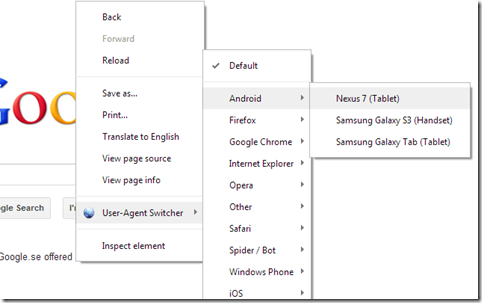
You may come with problem like browse mobile sites with your PC browsers like Mozilla Firefox, Google chrome,Internet Explorer etc. Mobile sites are not open and they may shows an empty page instead of content. Mobile site designers develop sites based on the mobile web browser interface.

But there is a way to browse mobile sites and download mobile content on PC. That's an add-on called
User agent switcher. You can add this to your browser to browse mobile sites. User agent switcher is an add-on available on Firefox and chrome.

mobile-pc-screen

DOWNLOAD USER AGENT SWITCHER

Download for Chrome

Download for Firefox

Go to the above link & click on Add to Firefox .

Now a confirmation dialogue box will be displayed,click on install now button.

Add on will be installed.

Now restart Firefox for taking this effect to the browser.

ins

Now go to Tools menu in menu bar and select default user agent,it shows available  agents.

Select  iPhone 3.0 by clicking on it.Type the url  of the mobile sites like Teluguwap.net ,mobile9.com .

user-agent-switcher

68b008f8_smush_2  

CLICK HERE FOR MORE WINDOWS MOBILE OR LUMIA TIPS AND TRICKS.

CLICK HERE FOR MORE ANDROID TIPS AND TRICKS.

CLICK HERE FOR MORE COMPUTER TRICKS.

FOR CHROME BROWSER:-

chrome

You can access all WebPages that includes in the mobile site and also download content from it.

You can also access railway reservation site faster than desktop site .

BEFORE YOU LEAVE….

Please Sign-up for our free newsletter to get all new UPDATES directly in your Inbox.

We need your Support & Like for our Facebook Page - Visit here official facebook page for more posts and click LIKE button.

You may also interested in

HOW TO FIND THE MOBILE NUMBER OF ANY SIM CARD

How To Remove Shortcut Virus From Pendrives And Memory Cards

Easily Remove Your Pendrive Virus Without Using Any Antivirus

How To Get Your Forgotten Nokia Phone's Security Master Code Easily?

Saturday, August 23, 2014

Android Mobile & Computer - Simple Trick To Faster Page Loading In Chrome Browser

If you are experiencing slow page loading in your Chrome browser, especially after opening several tabs at a time, here is a fix to solve the issue. By default, Chrome browser uses 128MB of memory, but by increasing this value, you can improve your browser’s performance, especially on your Android Mobile and also on your computer.

CLICK HERE FOR MORE WINDOWS MOBILE OR LUMIA TIPS AND TRICKS.

CLICK HERE FOR MORE ANDROID TIPS AND TRICKS.

google-chrome-instant-pages

Chrome browser has a hidden option (experimental) to increase its memory usage. Assigning more memory (RAM) to the browser will increase its performance –means faster page loading and smoother scrolling.

Here is how to change memory usage of Chrome.
1. Open Chrome browser and type chrome://flags/#max-tiles-for-interest-area in the address bar and hit enter.

chrome

2. Now, click the Default button under “Maximum tiles for interest area”. Select either 256 or 512MB RAM option. Go to the bottom of the page and click Launch Now.


Done! You can now enjoy faster and smoother performance while browsing the web, especially on your Android Mobile. You can also see the difference in Windows, Mac, and Linux computer.

Try this trick and comment below your experience.

Sign-up for our free newsletter to get all new articles directly in your Inbox.

Support & Like our Facebook Page - Visit here official facebook page for more posts and click LIKE button.

You may also interested in

HOW TO FIND THE MOBILE NUMBER OF ANY SIM CARD
How To Remove Shortcut Virus From Pendrives And Memory Cards
Easily Remove Your Pendrive Virus Without Using Any Antivirus
How To Get Your Forgotten Nokia Phone's Security Master Code Easily?